
The best apps to track your steps in 2026 are Apple Health for iPhone basics, Samsung Health for Android and Galaxy Watch users, Pedometer++ for a simple iPhone pedometer, and MistyWay if you want step tracking plus motivation. MistyWay works without GPS, has no ads, and turns steps into quests, streaks, friends, achievements, and a fantasy RPG world.
- Best built-in iPhone option: Apple Health / Apple Fitness.
- Best built-in Android option: Samsung Health, or Google Fit where it is still supported.
- Best simple iPhone pedometer: Pedometer++, if you only want raw numbers.
- Best for motivation: MistyWay, because it gives every walk a quest, not just a daily number.
- Best free no-ad option: compare free pedometer apps without ads.
Your phone has been counting your steps since the day you bought it. Apple Health and Google Fit run silently in the background, logging every walk to the kitchen and every stroll around the block. So why would you install another step counter app?
Because counting steps is easy. Keeping you walking is hard. The best step counter apps in 2026 don't just measure your movement — they give you a reason to move more tomorrow. We compared seven popular step tracking options by platform support, battery use, privacy, ads, GPS requirements, motivation design, and whether the app is likely to survive week two.
Quick Picks: Best Apps to Track Steps
| Need | Best Pick | Why |
|---|---|---|
| More motivation to walk | MistyWay | Fantasy quests, streaks, friends, no ads, no GPS. |
| Built-in iPhone step tracking | Apple Health / Fitness | Free, already installed, works with Apple Watch. |
| Built-in Android step tracking | Samsung Health | Free, strong phone and Galaxy Watch support. |
| Simple iPhone pedometer | Pedometer++ | Clean step count, no account, no GPS. |
| Group walking challenges | Pacer | Social groups, challenges, route options. |
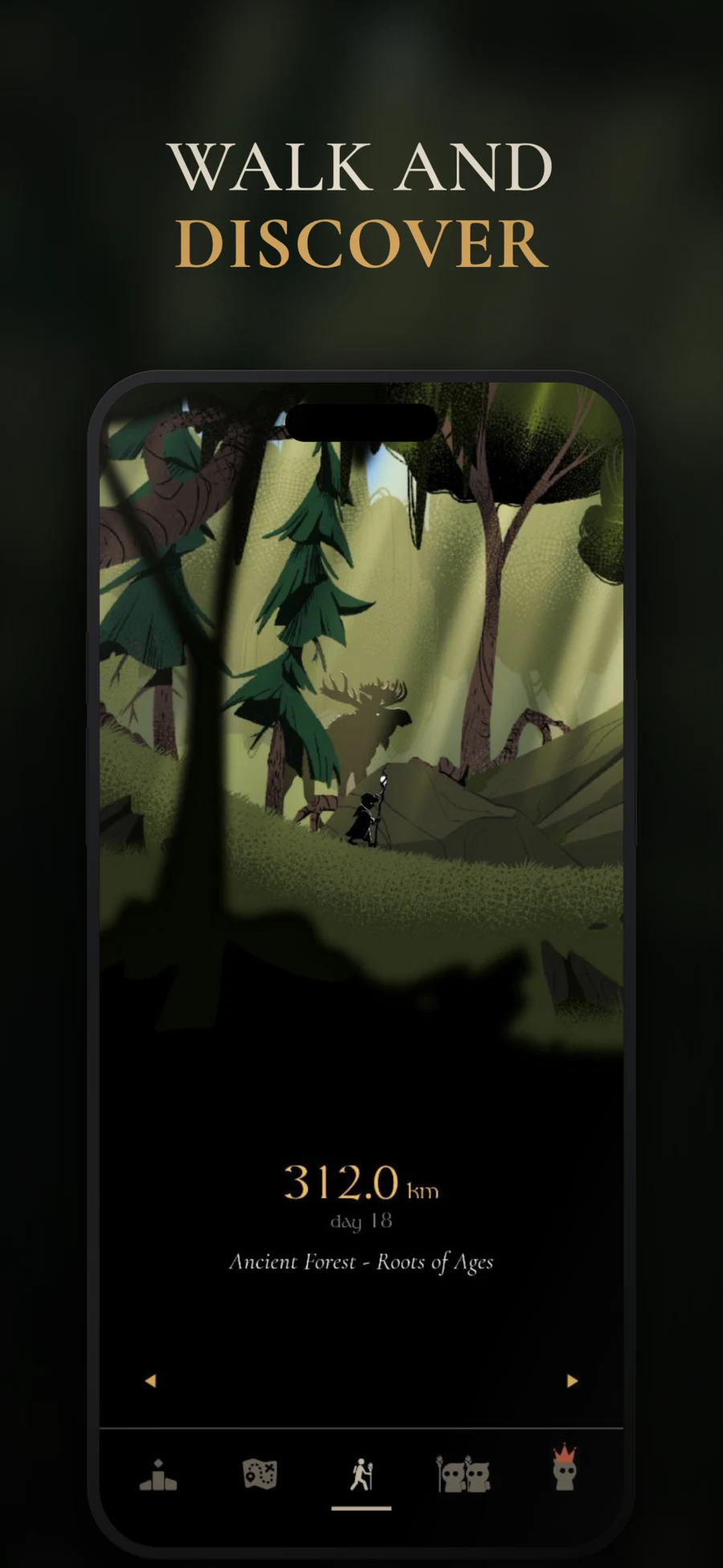
MORE THAN A STEP COUNT
MistyWay tracks your steps and turns them into quests, streaks, friends, and RPG progress.
No ads · No GPS route tracking · Free to start
What Makes a Good Step Counter?
After reviewing pedometer apps over the years, four qualities separate the ones people keep from the ones they delete after a week:
Accuracy. A step counter that over-counts by 20% or misses steps when your phone is in a bag isn't useful. The best apps use sensor fusion — combining accelerometer, gyroscope, and barometer data — to distinguish walking from other movements like driving over a bumpy road or fidgeting at your desk.
Battery efficiency. Step counting should be invisible. If an app drains your battery by 10% per day or heats up your phone, it's doing something wrong — probably running GPS in the background when it doesn't need to. Good pedometer apps use the low-power motion coprocessor (Apple's CMPedometer or Android's Step Counter sensor) which sips less than 2% battery daily.
Privacy. Many fitness apps request GPS, microphone, and contact access during setup. A step counter doesn't need any of that. The question is simple: does the app need to know where you walk, or just how much you walk? Apps that require GPS are tracking your routes and potentially selling that data. Apps that use only the accelerometer are counting steps and nothing else.
Motivation design. This is where most pedometers fail. Showing a number on a screen does not change behavior. The apps with the highest long-term retention use proven behavioral techniques: streaks you don't want to break, social accountability through friends and leaderboards, variable rewards that keep you curious, and progress systems that give you a sense of forward movement.
7 Best Apps to Track Steps Ranked
1. MistyWay — Gamified RPG Step Counter
MistyWay turns step counting into a fantasy RPG adventure. Every step moves your hero through a hand-drawn world of 45 locations, from peaceful forests to volcanic wastelands. It syncs with Apple Health, Google Fit, Garmin, Fitbit, Samsung Health, Polar, Suunto, and Withings — so your steps count whether they come from your phone, a smartwatch, or a treadmill.
MistyWay reads from Apple Health, Google Fit, and supported wearable integrations rather than running a separate GPS route tracker. The real difference is what happens with those steps: you unlock story quests, earn achievements across nine different series, compete on friend leaderboards with overtake notifications, and build daily streaks with freeze protection.
Pros: No GPS tracking, syncs with every major fitness tracker, strong motivation through quests and streaks, weekly challenges that adapt to your pace, unlimited free friends and leaderboards. Cons: The RPG theme isn't for everyone, premium is needed for unlimited adventure distance, newer app with a smaller community than established competitors.
Accuracy: Matches system pedometer (Apple Health/Google Fit). Privacy: No GPS, no location tracking, step count only. Price: Free core experience; premium subscription for extended content.

2. Apple Health / Google Fit — Built-In and Always Running
The step counter already on your phone is genuinely good. Apple Health on iPhone and Samsung Health or Google Fit on Android run quietly in the background, which means most people can track steps without installing anything new. There's nothing to configure beyond granting normal health permissions.
Built-in apps usually have the best battery profile because they rely on system motion APIs and supported wearables. Accuracy still depends on where you carry the phone: a front pocket or watch is more reliable than a loose bag.
Pros: Pre-installed, zero battery impact, extremely accurate, integrates with hundreds of third-party apps, completely free. Cons: Minimal motivation features, no social elements, no gamification, just a number on a screen. Apple Health is iOS only; Google Fit is Android only.
Accuracy: Strong phone/wearable baseline. Privacy: Depends on platform settings. Price: Free.
3. Pacer — Social Walking with Groups
Pacer's strength is its social layer. You can join walking groups organized by topic — weight loss, dog walking, post-surgery recovery — and participate in group challenges. The app tracks steps, distance, calories, and active minutes, with a clean dashboard that shows weekly trends.
Pacer can use step tracking alongside optional route features. The app requests GPS access for route tracking, though you can deny it and still count steps.
Pros: Large active community, guided walking workouts, group challenges create accountability, works on both iOS and Android. Cons: The free version has frequent ads, GPS requested by default, and some group challenges require premium to join.
Accuracy: Depends on phone and wearable setup. Privacy: GPS optional but requested. Price: Free with ads; paid premium plan.
4. StepsApp — Clean Design with Apple Watch Integration
StepsApp has one of the cleanest visual designs in the pedometer category. The main screen is a single circular progress ring that fills as you walk, with your step count, distance, and calories displayed below. It integrates tightly with Apple Watch, showing a complication on your watch face that updates in real time.
StepsApp reads directly from Apple Health on iPhone, so the step count is closely tied to the system pedometer and Apple Watch data. The Android version uses a different setup and is less central to the product.
Pros: Beautiful minimal UI, excellent Apple Watch app, widget support, detailed weekly and monthly charts, exports to CSV. Cons: iOS experience is significantly better than Android, limited social features, premium required for historical data beyond one week, no gamification.
Accuracy: Strongest on iPhone / Apple Watch. Privacy: No GPS required. Price: Free basic; paid Pro plan.
5. Pedometer++ — Simple, Accurate, iOS Only
Pedometer++ by David Smith is the most no-nonsense step counter available. It does one thing — count your steps — and does it exceptionally well. The app shows today's step count, a weekly bar chart, and a monthly calendar view. That's it. No accounts, no social features, no gamification, no ads.
Pedometer++ reads from Apple's CMPedometer framework and keeps the experience focused on steps, distance, and trends. The Apple Watch complication is one of the best available.
Pros: Extremely simple, very accurate, no ads, no account required, tiny app size, great Apple Watch support, built by a respected indie developer. Cons: iOS and Apple Watch only, no Android version, no motivation features whatsoever, no social elements.
Accuracy: Strong iPhone / Apple Watch step baseline. Privacy: No GPS, no account, minimal data collection. Price: Free; optional tip jar.
6. Samsung Health — Samsung Ecosystem Hub
If you own a Samsung phone and a Galaxy Watch, Samsung Health is the obvious choice. It's deeply integrated with Samsung's hardware, automatically syncing steps from your watch, phone, and Galaxy Ring. The app includes step counting, workout tracking, sleep monitoring, stress measurement, and body composition (on supported Galaxy Watches).
Samsung Health is strongest when paired with a Galaxy Watch because the watch catches steps that the phone misses when it's on a desk or in a bag. Samsung Health also integrates with a limited number of third-party apps.
Pros: Excellent Galaxy Watch integration, comprehensive health tracking beyond steps, food logging, sleep tracking, free with no ads. Cons: Best features require Samsung hardware, limited third-party ecosystem compared to Apple Health, the app is heavy and complex for people who just want a step counter, not available on iOS.
Accuracy: Strongest with Galaxy Watch. Privacy: Samsung account required, data synced to Samsung servers. Price: Free.
7. Leap Fitness Step Counter — Basic Free Option
Leap Fitness makes a straightforward step counter for Android that works well enough for casual use. The interface shows your daily steps, distance, and calories with a simple progress bar. It includes a seven-day history chart and lets you set a daily step goal. The app is lightweight and runs on older Android devices that struggle with more complex fitness apps.
The app uses its own step detection rather than leaning entirely on Google Fit, so results can vary more by phone model and carry position. It is useful as a simple Android option, but not the best choice if long-term motivation matters.
Pros: Completely free, very lightweight, works on older Android phones, simple to use. Cons: Contains ads (removable with one-time purchase), lower accuracy than competitors, no smartwatch support, no social features, the free version has limited historical data.
Accuracy: Basic phone-sensor counting. Privacy: Contains ads with tracking, no GPS required for steps. Price: Free with ads; paid ad-removal option.
How Step Counters Work
Every smartphone contains an accelerometer — a tiny chip that measures acceleration forces in three dimensions. When you walk, each step produces a distinctive acceleration pattern: a slight upward bounce as you push off, forward movement, and a downward impact as your foot hits the ground. Step counting algorithms detect these patterns and filter out non-walking movements.
Modern phones also contain a gyroscope (measuring rotation) and sometimes a barometer (measuring air pressure changes that indicate elevation). The best step counting algorithms use sensor fusion — combining data from all three sensors to build a more accurate picture of your movement. This is how they distinguish walking from driving on a rough road or bouncing your leg under a desk.
Both Apple and Google have dedicated low-power chips specifically for motion processing. Apple's motion coprocessor (used by CMPedometer) and Android's hardware Step Counter sensor run continuously without waking the main processor, which is why built-in step counting uses almost no battery. Third-party apps that run their own algorithms on the main processor tend to use more battery and are often less accurate.
Step Counter Accuracy: Phone vs Smartwatch
Where you carry your device matters more than which app you use. Use these ranges as a practical expectation, not a lab guarantee:
| Device Position | Accuracy Range | Why |
|---|---|---|
| Smartwatch on wrist | 95-98% | Wrist swing during walking is extremely consistent and easy for algorithms to detect |
| Phone in front pocket | 90-95% | Hip movement during walking is reliable but varies with clothing tightness |
| Phone in back pocket | 88-93% | Similar to front pocket but slightly less consistent acceleration patterns |
| Phone in hand | 85-90% | Arm swing is irregular; hand movements create false positives |
| Phone in bag | 80-88% | Phone moves independently of your body; dampened acceleration signals |
The single biggest accuracy improvement you can make is pairing a smartwatch with your step counter app. A watch on your wrist captures virtually every step because your arms swing predictably when you walk. It also catches steps your phone misses — like when you walk around the office without your phone, or exercise on a treadmill with your phone on the console.
If you don't have a smartwatch, keeping your phone in a front pocket gives the best results. Avoid carrying it in your hand while walking if accuracy matters to you — the irregular hand movements create noise that algorithms struggle to filter out.
Privacy Comparison
Not all step counters treat your data the same way. Some apps need nothing beyond your step count. Others want your GPS location, your contacts list, and permission to serve you targeted ads. Here's how the apps in this guide compare:
| App | GPS Required | Account Required | Ads / Tracking | Data Sharing |
|---|---|---|---|---|
| MistyWay | No | Optional | No ads | None |
| Apple Health | No | Apple ID | No ads | None (on-device) |
| Google Fit | Optional | Google account | No ads | Google ecosystem |
| Pedometer++ | No | No | No ads | None |
| StepsApp | No | Optional | Free: minimal ads | None |
| Pacer | Optional (default on) | Yes | Free: frequent ads | Ad partners |
| Samsung Health | Optional | Samsung account | No ads | Samsung servers |
| Leap Fitness | No | No | Ads with tracking | Ad partners |
The cleanest options from a privacy perspective are Pedometer++ (no account, no ads, no tracking), Apple Health (data stays on your device), and MistyWay (no GPS, no ads, optional account). If privacy is your top concern, avoid apps that default to GPS tracking and read the privacy policy before granting any permissions during setup.
Want to understand more about walking app privacy? Read our deep dive on why MistyWay doesn't track your location. Looking for ad-free options specifically? See our guide to free pedometer apps without ads.
FAQ
Are step counter apps accurate?
Modern step counter apps using smartphone accelerometers are typically 90-95% accurate when the phone is in your pocket. Accuracy drops to 85-90% when holding the phone in your hand. Smartwatch-based counting is the most reliable at 95-98% accuracy because the wrist motion during walking is very consistent.
Do step counter apps drain battery?
Step counting itself uses very little battery because it relies on the low-power accelerometer chip, not GPS. Apps that track GPS routes or display constant notifications will drain more. A well-designed pedometer app typically uses less than 2-3% of battery per day for step counting alone.
Can I use a step counter without GPS?
Yes. Step counters use accelerometers and gyroscopes to detect walking motion, not GPS. Some apps request GPS access for route mapping, but it is not required for counting steps. Apps like MistyWay, Apple Health, and Pedometer++ count steps without any location tracking.
What is the best app to track your steps?
The best app to track your steps depends on your goal. Apple Health / Apple Fitness is best for iPhone basics, Samsung Health is best for Android basics, Pedometer++ is best if you want a simple iPhone pedometer, and MistyWay is best if you want step tracking with motivation, quests, no ads, and no GPS.
The Bottom Line
If you just want accurate step counting with zero friction, use Apple Health or Google Fit. They're already on your phone, they're free, and they're accurate. If you want something that actually motivates you to walk more, the choice depends on your personality: Pacer for social accountability, StepsApp for beautiful data visualization, Pedometer++ for dead-simple reliability, or MistyWay if you want your steps to mean something beyond a number.
The best step counter is the one that makes you walk more tomorrow. Try two or three from this list for a week each and see which one you actually open.
Already tracking your steps? Learn whether 10,000 steps is the right goal, compare gamified vs plain pedometers, convert your step count to miles, explore walking games that turn every step into gameplay, or compare apps that pay you to walk. Starting a walking habit from scratch? Read our guide to building a daily walking habit.